
SALES CHALLENGE
Replace Spreadsheets & Manual Quotes
If your team builds quotes in Word or Excel, you are spending too much time assembling documents, looking up pricing, correcting totals, and manually following up with customers. QuoteWerks replaces manual quoting with a structured quoting system that automatically handles products, pricing, totals, formatting, and delivery.

THE REALITY OF SPREADSHEET QUOTING
Why Most Companies Start with Word, Excel, Google Docs, or Google Sheets
Many sales teams begin their quoting process using familiar tools like Microsoft Word, Microsoft Excel, Google Docs, or Google Sheets. These tools are readily available and make it easy to create a basic quote template when a company is just getting started.
For a small number of products or services, a simple spreadsheet or document can work reasonably well. Sales reps can copy a previous quote, update the customer information, adjust the pricing, and send it to the customer.
However, as quoting volume grows and product catalogs expand, these tools begin to create more work than they solve.
Sales teams start spending time copying and pasting information between systems, manually looking up product pricing, adjusting formulas, and reformatting documents for every quote they send.
What started as a quick solution slowly turns into a manual quoting process that is difficult to manage at scale.
Common challenges include:
Manually copying customer information from a CRM into the quote
Looking up product descriptions, costs, and pricing across multiple spreadsheets
Re-entering data that already exists in other systems
Fixing broken spreadsheet formulas or incorrect totals
Managing multiple versions of the same quote
Inconsistent document formatting across sales reps
Difficulty tracking which quotes have been sent, viewed, or accepted
As quoting becomes more complex, relying on document templates and spreadsheets can slow down the sales process and introduce costly errors.
THE MANUAL QUOTING PROCESS
What Creating a Quote in Word or Excel Actually Looks Like
Creating a quote using spreadsheets or document templates typically involves multiple manual steps. Each step introduces potential delays and opportunities for errors.
Manual Data Entry
Information Gets Re-Entered Everywhere
Copy customer info between systems
Re-enter products and pricing
Build every quote from scratch
Pricing & Formula Errors
Spreadsheets Introduce Costly Mistakes
Broken or overwritten formulas
Incorrect totals or discounts
Margin errors
Inconsistent Quotes
Every Rep Builds Quotes Differently
Different formatting and layouts
Missing terms or conditions
Unprofessional customer experience
No Visibility or Tracking
Quotes Are Hard to Track
Files scattered across folders
No clear quote status
Limited reporting or insights
Enter Customer Information
Sales reps begin by typing or copying customer contact details into the quote template. This information often comes from a CRM, email, or contact list.
Look Up Products and Pricing
Products must be manually searched across vendor price lists, distributor catalogs, internal spreadsheets, or previous quotes.
Descriptions, part numbers, and pricing must then be entered manually into the document.
Calculate Totals
Sales reps rely on spreadsheet formulas or manual math to calculate extensions, totals, discounts, and taxes. If formulas are broken or copied incorrectly, errors can easily occur.
Format the Quote Document
The quote must be formatted so customers only see the relevant information. Internal pricing, notes, and cost details must be hidden or removed.
Supporting documents such as product literature or specifications may also need to be attached.
Send the Quote
Sales reps create an email, attach the quote file, and send it to the customer. If multiple files are involved, they must all be tracked manually.
Follow Up
Follow-up reminders must be manually added to calendars or CRM systems to ensure the opportunity does not stall.
Revise the Quote
When a customer requests changes, the process often starts again with updates to pricing, quantities, or configuration details.

A BETTER APPROACH
How QuoteWerks Automates the Quoting Process
QuoteWerks replaces manual quoting tasks with an integrated quoting platform designed specifically for sales teams.
Instead of building quotes from scratch, sales reps work inside a structured system where customer data, product catalogs, pricing rules, and document templates are already connected.
This allows quotes to be created faster and more accurately.
With QuoteWerks you can:
Pull customer information directly from your CRM
Access centralized product and service catalogs
Automatically calculate pricing and totals
Apply consistent document templates
Deliver quotes electronically
Track quote activity and status
The result is a faster and more controlled quoting process.
BUSINESS IMPACT
What Happens When You Replace Spreadsheet Quoting
When companies move from manual quoting tools to a dedicated quoting platform, several operational improvements occur.
Faster Quote Creation
Sales reps spend less time assembling documents and more time selling.
Fewer Pricing Errors
Automated calculations eliminate formula mistakes and inconsistent pricing.
Standardized Quote Documents
Every quote follows the same professional structure and branding.
Better Sales Visibility
Managers can see what quotes are being created, sent, revised, and won.
Improved Collaboration
Sales, finance, and operations teams work from the same quote data.
Faster Deal Cycles
Create and revise quotes faster so deals don’t stall.

CENTRALIZED QUOTE MANAGEMENT
Organize and Track Every Quote
With spreadsheets and documents, quotes are scattered across folders, email attachments, and personal desktops.
QuoteWerks stores all quotes in a centralized system where they can be searched and filtered by:
Customer
Sales representative
Quote number
Date
Status
Product or vendor
- or any other relevant information
This provides greater visibility into the sales pipeline and makes reporting easier.
FROM QUOTE TO ORDER
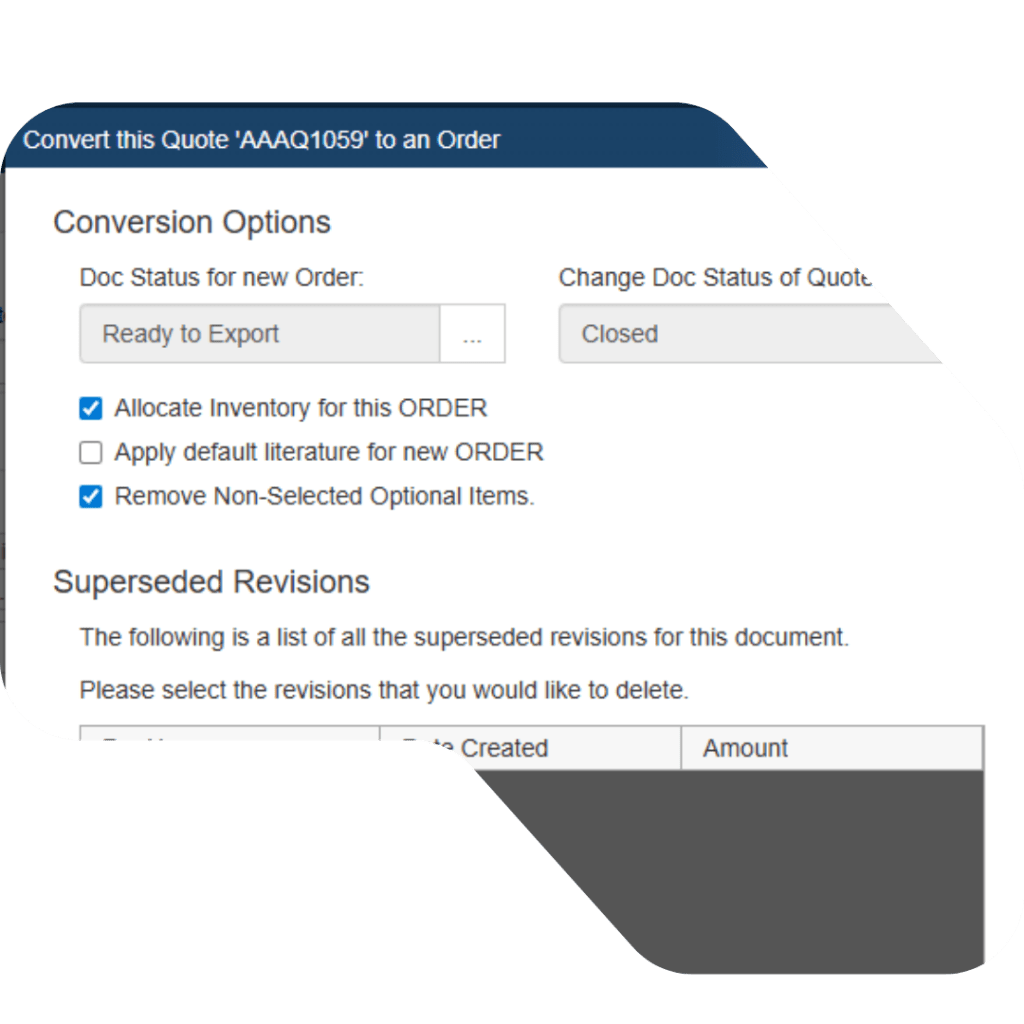
Turn Quotes into Orders Without Re-Entering Data
When a quote is approved, the information should not have to be retyped into other systems.
QuoteWerks can pass quote information to connected CRM, accounting, or PSA systems so the transition from quote to order is seamless.
This reduces administrative work and prevents data entry errors.

WHEN IT’S TIME TO MOVE BEYOND SPREADSHEETS
Signs Your Team Has Outgrown Manual Quoting
Many companies reach a point where spreadsheets no longer support their quoting process effectively.
Typical indicators include:
Quotes taking too long to produce
Frequent pricing or calculation mistakes
Difficulty tracking quotes across the team
Inconsistent quote formatting
Re-entering the same information across systems
When these problems appear regularly, it is usually time to move to a dedicated quoting platform.
NEXT STEP
Replace Spreadsheet Quoting with QuoteWerks
QuoteWerks helps sales teams create professional quotes faster while maintaining pricing accuracy and operational control.
See how QuoteWerks can streamline your quoting process and eliminate the manual work involved with Word and Excel quoting.
QUOTING COMPARISON
Spreadsheet Quoting vs QuoteWerks for CPQ
Many companies begin creating quotes in Excel, Google Sheets, or document templates, but as sales processes grow more complex these tools become difficult to manage.
The table below highlights how manual quoting compares to a dedicated quoting platform.
| Feature | Word / Excel / Google Sheets / Docs | QuoteWerks |
|---|---|---|
|
Customer Information |
❌Manually copied from CRM or email |
✔Pulled directly from CRM |
|
Product & Pricing Lookup |
❌Manual searches across price lists |
✔Centralized product catalog |
|
Quote Calculations |
❌Spreadsheet formulas or manual math |
✔Automatic totals, discounts, and taxes |
|
Quote Formatting |
❌Templates copied and edited manually |
✔Consistent automated document templates |
|
Quote Delivery |
❌Attach files manually to emails |
✔Send quotes electronically |
|
Quote Revisions |
❌Rebuild or edit documents manually |
✔Update and resend quickly |
|
Quote Tracking |
❌No visibility after sending |
✔Track quote activity and status |
|
Quote Organization |
❌Files scattered across folders |
✔Centralized quote management |
|
Sales Visibility |
❌Limited reporting |
✔Quote pipeline reporting and Integrations |
|
Deal Speed |
❌Slower response times |
✔Faster quote turnaround |
|
Approval Workflows |
❌Manual emails and approvals |
✔Automated approval workflows |
QUOTING FAQ
Frequently Asked Questions About Spreadsheet Quoting and CPQ Software
Many companies begin their quoting process using familiar tools like Microsoft Excel, Google Sheets, Word, or Google Docs because they are readily available and easy to use. For simple quotes with only a few products, spreadsheets and document templates can work reasonably well.
However, as quoting complexity grows and sales teams expand, these tools become difficult to manage and can introduce errors, inefficiencies, and inconsistent quote documents.
Spreadsheets and document templates often require manual data entry, product lookups, and pricing calculations. This can lead to broken formulas, incorrect totals, inconsistent quote formatting, and time-consuming revisions.
Quotes created in spreadsheets are also difficult to track once they are sent to customers, making it harder for sales teams to monitor pipeline activity and follow up effectively.
Companies typically outgrow spreadsheet quoting when quote volume increases, product catalogs become larger, or sales teams need better visibility into their quoting process.
Common signs include slow quote creation, frequent pricing errors, difficulty tracking quotes, inconsistent documents, and repeated manual data entry.
CPQ stands for Configure, Price, Quote. CPQ software helps sales teams generate accurate quotes by connecting customer data, product catalogs, pricing rules, and document templates in a single system.
This allows quotes to be created faster, reduces pricing errors, and provides better visibility into the sales pipeline.
QuoteWerks replaces manual quoting tools with a structured quoting platform. Sales teams can pull customer information from their CRM, access centralized product catalogs, automatically calculate totals and discounts, generate professional quote documents, and track quote activity.
This helps sales teams produce quotes faster while maintaining pricing accuracy and consistency.
Yes. QuoteWerks integrates with popular CRM platforms so customer information, opportunities, and quote data stay synchronized. This eliminates manual data entry and helps sales teams maintain accurate records across systems.
While spreadsheets can work for simple quotes, they are difficult to manage as sales processes grow. QuoteWerks provides a centralized quoting platform that automates pricing calculations, standardizes quote documents, tracks quote activity, and integrates with CRM systems.
This allows companies to move beyond manual quoting and manage their sales process more efficiently.