
QuoteWerks + ConnectWise PSA Integration: CPQ Software for MSPs
Quote, Win, and Push Everything to ConnectWise Automatically
QuoteWerks is CPQ quoting software for MSPs using ConnectWise PSA (formerly ConnectWise Manage). Build accurate quotes, collect approvals, and automatically create opportunities, tickets, projects, and agreements in ConnectWise.


CONNECTWISE PSA CPQ INTEGRATION FOR MSPS
Quoting Built for ConnectWise MSPs
QuoteWerks integrates directly with ConnectWise PSA (formerly ConnectWise Manage) to streamline quoting for MSPs. Built specifically for IT service providers, QuoteWerks eliminates double entry between sales and service by automatically syncing opportunities, products, projects, agreements, and tickets. This integration allows sales teams to generate accurate quotes while keeping ConnectWise opportunities, orders, and service workflows up to date.
If you run your MSP on ConnectWise, QuoteWerks becomes your sales-to-service control layer.
Eliminate Double Entry
Automatically sync quotes, products, recurring services, and approvals into ConnectWise PSA. Sales stops rekeying data. Service stops rebuilding deals. Your team focuses on execution, not administration.
Protect Margin and Forecasting
QuoteWerks keeps pricing, bundles, and managed services structured and aligned with ConnectWise Opportunities. Forecasting reflects what was actually sold, reducing costly errors and missed revenue.
Automate ConnectWise Workflow
Turn approved quotes into Projects, Agreements, Tickets, and Purchasing records automatically inside ConnectWise PSA. Reduce handoff friction and shorten your quote-to-cash cycle.
CONNECTWISE PSA + CPQ
A Complete CPQ Platform, Not Just Another Add-On
Unlike lightweight quoting tools or basic CRM add-ons, QuoteWerks is a full Configure, Price, Quote (CPQ) system designed for real-world MSP sales complexity.
Our ConnectWise PSA integration keeps opportunities accurate, automates quoting workflows, and ensures every approved quote flows directly into ConnectWise for execution. No spreadsheets. No rekeying. No operational disconnect between sales and service.
For MSPs that depend on ConnectWise PSA, this is quoting software built to fit your operational model.

MSP SALES ALIGNMENT
Keep ConnectWise PSA Opportunities Accurate Automatically
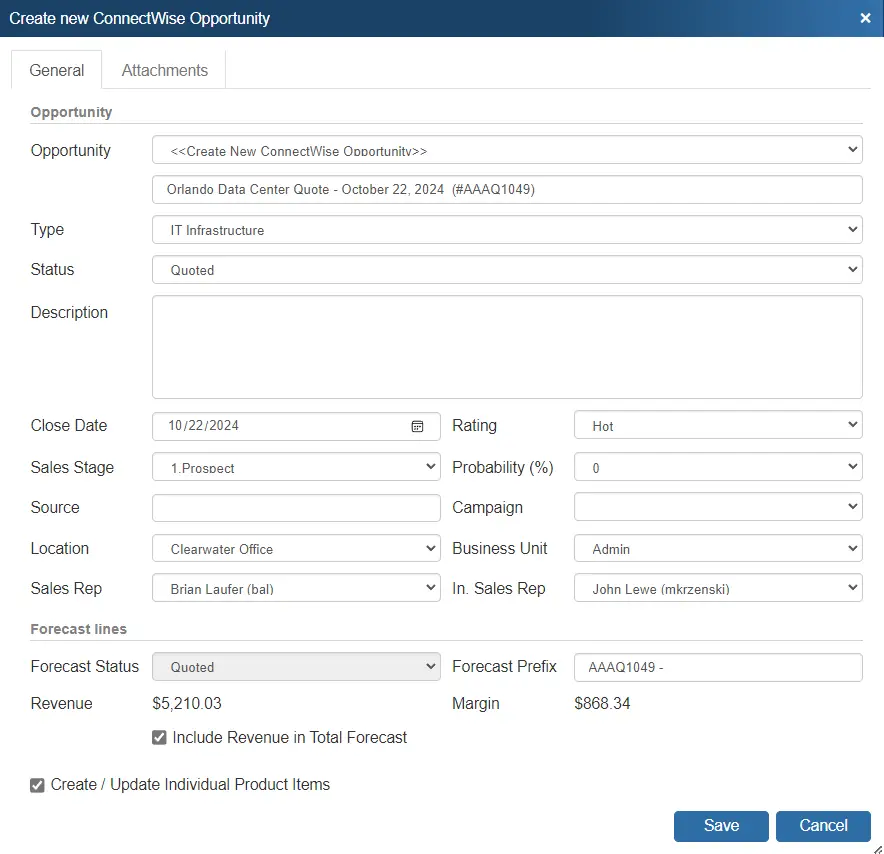
QuoteWerks creates and updates ConnectWise PSA opportunities in real time, attaching products, bundles, recurring revenue, and managed services directly to the record.
Sales forecasting reflects what was actually quoted. Activities can be scheduled from within the quoting workflow. ConnectWise remains your system of record without requiring manual updates.
For MSP leadership, that means cleaner pipelines and stronger visibility.
AUTOMATED EXECUTION
Turn Approved Quotes into ConnectWise Tickets, Projects, and Agreements
When a quote is approved, QuoteWerks pushes structured data into ConnectWise PSA to create:
-
Service Tickets
-
Sales Orders
-
Agreements
-
Projects and Project Phases
-
Purchase Orders and serial tracking
Your service team receives organized, execution-ready data without rebuilding the sale inside ConnectWise.
This is where true MSP CPQ software creates operational leverage.

WHY MSPS CHOOSE QUOTEWERKS
Proven Quoting Software for the ConnectWise Community
MSPs choose QuoteWerks because it delivers CPQ power without enterprise implementation complexity.
Fast deployment — no months-long consulting
Concurrent licensing — no wasted seats
Direct phone support — real humans when you need them
100% money-back guarantee
QuoteWerks has supported ConnectWise environments for years, making it one of the most established quoting integrations in the MSP ecosystem.
CRM + CONNECTWISE FLEXIBILITY
Use Your CRM for Pipeline, ConnectWise for Execution
If your MSP uses HubSpot, Salesforce, or another CRM for pipeline management, QuoteWerks connects both systems. Quotes can originate from your CRM while finalized orders, agreements, and service records flow into ConnectWise PSA for fulfillment. We call this ConnectWise as a secondary CRM.
You maintain operational discipline without forcing your team into a single system.

How MSPs Use QuoteWerks with ConnectWise PSA
New Client Onboarding
Quote → Approval → Project Created → Service Execution
Managed Services Expansion
Recurring agreement automatically updated in ConnectWise
Hardware Refresh Projects
Bundles convert into project phases with purchasing synced
Core Platform Comparisons
QuoteWerks vs Basic ConnectWise Quoting Tools
Not all quoting tools built for ConnectWise PSA are full CPQ platforms. While basic quoting solutions may generate simple quotes, MSPs with complex products, managed services, and purchasing workflows often require deeper automation and tighter operational integration.
Here’s how QuoteWerks compares.
| Capability | QuoteWerks | Basic Quoting Tools |
|---|---|---|
| Full CPQ Engine | Yes | Limited |
| Deep ConnectWise PSA Integration | Yes | Partial |
| Bundles to Project Phases | Yes | Rare |
| Purchasing + Serial Sync | Yes | Limited |
| Concurrent Licensing | Yes | Typically No |
| Direct Phone Support | Yes | Often Ticket-Based |
ConnectWise PSA, CPQ, and Integration FAQ
The Specifics: QuoteWerks Integration With ConnectWise
From our Sold To / Ship To tab of the QuoteWerks quote workbook, you can search the ConnectWise database for a contact by name, company name, or phone number. QuoteWerks will fill in the contact information in the quote by pulling the contact information from the contact that you searched for. You will never have to re-type your customer information.
When emailing a quote or proposal to your customer, the PDF of the document is automatically attached to the opportunity so that other people in your organization that do not have QuoteWerks can open and view quotes. This is especially useful for your technicians and service reps.
When saving a quote, QuoteWerks automatically creates a link to the quote under the Documents tab in the ConnectWise Opportunity. Additionally, when you are in ConnectWise working with a contact, you will see all the quotes that you have created for them. You can even click on the attachment and QuoteWerks will open and display the quote the attachment refers to. This feature is very useful for organizing and finding your quotes from within ConnectWise. If this is a remote install or satellite office, opening that document link will import that quote into that QuoteWerks installation.
When saving a quote, QuoteWerks automatically creates an Opportunity in ConnectWise. When you are in ConnectWise, you will see the sales opportunities and their sale amounts for each quote you have created for this contact. The Opportunity feature is very useful in determining your projected cash flow.
When creating/updating a ConnectWise Opportunity, QuoteWerks can automatically aggregate your forecast types on the quote, create the products, services, and more in the opportunity. The QuoteWerks mappings enable you to configure QuoteWerks for your specific ConnectWise environment.
QuoteWerks supports the recurring revenue options in the ConnectWise opportunity. QuoteWerks line items configured as recurring flow seamlessly into the ConnectWise opportunity as recurring products and/or revenue forecast line(s).
QuoteWerks Groups, Bundles, and Configurations are supported as ConnectWise Bundles on ConnectWise Opportunities. When creating/updating a ConnectWise Opportunity QuoteWerks “Grouped Bundles” can be created in the ConnectWise Opportunity as Bundles (under the Forecast and Product tabs). In the ConnectWise Opportunity, you will see the bundle header and the corresponding products that make up that bundle. When sending over groups to ConnectWise Opportunities as ConnectWise bundles you can control if the bundle product in the ConnectWise Opportunity should create a Project phase when the Opportunity is converted to a Project from within ConnectWise.
We create quotes with the expectation that the quotes will become orders. When the customer accepts the quote, QuoteWerks will convert the quote to an order and also convert your existing ConnectWise Opportunity Forecasts to Won. If no Opportunity exists in ConnectWise! (This would be the case if a customer called to place an order without requesting a quote first), QuoteWerks will simply create a new completed Opportunity Forecast in ConnectWise. In ConnectWise, you can run reports that tell you how much income was generated from the orders you have received. QuoteWerks also has a built-in reporting module that can create similar reports.
When creating opportunities in ConnectWise, if line item detail is selected to be included with the opportunity, those products and services will be created in the ConnectWise product and services databases for future use. In fact, you can even use this feature to completely populate your ConnectWise product database (effectively importing products into ConnectWise) with products from QuoteWerks product databases or your QuickBooks items list.
Serialized Products
When saving a quote, QuoteWerks offers to schedule a call activity for you in ConnectWise. As you update your quote, you have the ability to update this same call activity in ConnectWise. By scheduling follow up calls, you increase your chances of closing the sale! The call activity will be listed under the Activities tab of the Opportunity and the Contact in ConnectWise.
When saving a quote, QuoteWerks enables you to create additional activities in ConnectWise. These one-off activities can be one of the pre-defined activities in ConnectWise or one that you have customized for your own internal business process flow. The activity will be listed under the Activities tab of the Opportunity and the Contact in ConnectWise.
QuoteWerks enables you to create Service Tickets in ConnectWise. When saving the quote, you can choose to create a single ticket or multiple service tickets (with or without creating/attaching an opportunity)! This is great for creating a service ticket for a site survey or to initiate any processes needed when creating a new quote or saving changes to an existing quote.
QuoteWerks enables you to use the products you already have in ConnectWise. QuoteWerks can link to the ConnectWise product database as a Product Data Source. From within QuoteWerks, you can search the ConnectWise product database and add these products to your QuoteWerks quote.
From the My Summary Dashboard in QuoteWerks, you will see all Opportunities in ConnectWise that need a Quote created. This feature was designed so people on the road using ConnectWise Mobile can enter basic specifications for the ConnectWise opportunity. Then, in the office, the person assigned to create quotes will automatically be notified that s/he needs to create a quote for this opportunity. The same concept applies even if the opportunity is created using regular ConnectWise instead of Mobile.
Products on the ConnectWise Opportunity will also be added to the new quote. This is helpful when using outside solutions like Labtech or JoomConnect that create Opportunities in ConnectWise.
Using the “Quote Button” Method
From the fully integrated Quote Button on ConnectWise Sales Opportunity, you can start a new quote or open an existing quote in QuoteWerks and populate it with the opportunity’s details from within ConnectWise even if QuoteWerks is not already running. You can initiate this new or updated quote from the ConnectWise Opportunity.
Using the “Links” Method
You can start a new quote in QuoteWerks and populate it with the contact’s details from within ConnectWise even if QuoteWerks is not already running. You can initiate this new quote from the ConnectWise Contact or Opportunity.
QuoteWerks can easily create ConnectWise Purchase Orders that contain items from a single or multiple orders. Items that do not exist in ConnectWise will be created. Additionally if using the Online Ordering feature of the real-time module, after the items are ordered you will be asked if you want to create a Purchase Order in ConnectWise for the items you just ordered electronically. The ConnectWise Purchasing Module is required to use this feature. If you do not have the ConnectWise Purchasing Module, QuoteWerks can create POs in QuickBooks.
When you select the ConnectWise PSA (formerly Manage) contact to use in the quote, our innovative DataLink feature can automatically pull other information from ConnectWise into the quote such as sales tax, customer terms, customer profile, shipping method, etc. Customer profiles can be used by QuoteWerks to determine the appropriate pricing a particular customer should receive.
The ConnectWise DataLink is bi-directional, so field information can be copied from QuoteWerks into the ConnectWise opportunity and then fields can also be copied from the ConnectWise Opportunity into QuoteWerks. Additionally, information from QuoteWerks line items can be copied into ConnectWise Opportunity Line Items.
As an example, you can use the Datalink to auto-retrieve the Sales Tax Rate for the Company in ConnectWise into QuoteWerks.
When emailing from QuoteWerks, you can select to send the email to ConnectWise Contacts that are not associated with the QuoteWerks document.
Does your sales team utilize a CRM other than ConnectWise? QuoteWerks integrates with the leading CRM packages and provides the ability to use ConnectWise as a secondary CRM. This lets ConnectWise users use QuoteWerks with a CRM like HubSpot, Microsoft Dynamics CRM, salesforce.com, or the other supported CRMs to do all their prospecting and quoting leveraging our dynamic CRM integrations. Then, when the quote becomes an order, QuoteWerks can create or link to the customer in ConnectWise and create the sales opportunity, products, and service tickets, and more in ConnectWise.
From within QuoteWerks, you can enter a new lead in the quote and simply click on a button to create that company and contact in ConnectWise.
The QuoteWerks built-in ConnectWise integration is designed so that the administrator can setup how they want the information to flow from QuoteWerks to ConnectWise. There is an emphasis on the automation aspect of the integration. QuoteWerks does not require the sales rep to manually specify that “these 3 line items need to go into the Product forecast line, these 2 items need to go into the Manages Service forecast line, etc”; doing so, would introduce a myriad of user errors. When user input is required, such as when saving the quote, QuoteWerks prompts the sales rep with a simple checkbox asking if they want to create a ConnectWise opportunity and if they choose to do so, they will be prompted with a window to supply the required information.
General
What is the best CPQ software for ConnectWise PSA?
The best CPQ software for ConnectWise PSA is one that integrates deeply with opportunities, projects, agreements, and purchasing workflows. QuoteWerks is built specifically for MSPs using ConnectWise PSA (formerly ConnectWise Manage), allowing approved quotes to generate structured records automatically without re-entry.
Unlike lightweight quoting tools, QuoteWerks handles complex product bundles, managed services, recurring revenue, and purchasing integration inside ConnectWise.
Does ConnectWise PSA include built-in CPQ functionality?
ConnectWise PSA does not include a full-featured CPQ platform. While opportunities and products can be managed inside ConnectWise, advanced configuration rules, pricing logic, proposal formatting, and quoting automation require dedicated CPQ software.
Many MSPs use QuoteWerks as their ConnectWise CPQ solution to centralize pricing, automate quoting workflows, and eliminate manual errors.
How does QuoteWerks integrate with ConnectWise PSA?
QuoteWerks integrates directly with ConnectWise PSA to:
Create and update Opportunities
Attach products and bundles
Push recurring services and managed services
Generate Service Tickets
Create Sales Orders
Create or update Agreements
Create Projects and Project Phases
Sync Purchase Orders and serial numbers
This ensures clean sales-to-service handoff for MSP operations.
Can QuoteWerks update existing ConnectWise Opportunities?
Yes. QuoteWerks can create new opportunities or update existing ConnectWise PSA opportunities in real time. Products, pricing, recurring revenue, and status updates remain synchronized to keep forecasting accurate.
Is QuoteWerks built specifically for MSPs?
Yes. QuoteWerks is designed for MSP quoting complexity, including hardware, software, services, managed services, and recurring revenue models.
For MSPs running ConnectWise PSA, QuoteWerks acts as a dedicated quoting engine that protects margin and reduces operational friction.
What happens after a quote is approved?
When a quote is approved, QuoteWerks can automatically create:
Service Tickets
Agreements
Projects and phases
Sales Orders
Purchasing records
Structured data flows into ConnectWise PSA so service teams can execute immediately without rebuilding the sale.
Can I use HubSpot or Salesforce with ConnectWise PSA?
Yes. QuoteWerks supports CRM-first workflows. Quotes can originate from HubSpot, Salesforce, or another CRM while finalized operational records flow into ConnectWise PSA.
This allows MSPs to separate sales pipeline management from service execution while maintaining automation.
How is QuoteWerks different from other ConnectWise quoting tools?
QuoteWerks is a full CPQ platform, not just a quoting add-on. It supports:
Advanced pricing rules
Complex bundles
Recurring revenue structures
Deep purchasing integration
Concurrent licensing
Direct phone support
For MSPs needing operational discipline inside ConnectWise PSA, QuoteWerks provides deeper workflow automation than basic quoting tools.
Does QuoteWerks work with ConnectWise Manage?
Yes. ConnectWise Manage is now known as ConnectWise PSA. QuoteWerks supports both naming conventions and integrates directly with environments still referencing Manage.
This helps capture legacy search traffic.
Why do MSPs choose QuoteWerks over other ConnectWise CPQ tools?
MSPs choose QuoteWerks because it combines:
Established ConnectWise integration history
Strong MSP adoption
Flexible deployment options
Operational automation beyond simple quote creation
For MSPs running ConnectWise PSA, QuoteWerks becomes the quoting layer that connects sales, purchasing, and service into one automated workflow.