
No CRM Required
Built-In Contact Database for QuoteWerks Web
QuoteWerks has grown by connecting quoting directly to CRM systems, helping sales teams align quotes with pipeline, contacts, and customer data. At the same time, not every business operates within a supported CRM. Some companies do not use a CRM at all, rely on desktop systems, or use platforms that are not currently integrated with QuoteWerks Web.
QuoteWerks Web includes a built-in contact database that allows your team to manage customer information and create quotes without relying on a CRM. This gives you a structured quoting workflow while keeping your options open for future integrations.

Manage companies, contacts, and customer details directly inside your quoting software
QuoteWerks gives your team a built-in contact database to manage companies, contacts, and customer details directly within the quoting process if you do not have an integrated CRM.

Built Into QuoteWerks
Quoting software with a built-in contact database
A practical solution when CRM integration is not available or not needed
Many businesses still operate without a modern cloud CRM. Teams often rely on spreadsheets, Outlook contacts, legacy desktop systems, or a mix of disconnected tools. Others use CRMs that are not currently supported by QuoteWerks Web.
The built-in contact database gives your team a centralized place to manage companies and contacts so your quoting process does not depend on external systems. This improves accuracy, reduces manual entry, and creates consistency across quotes.
Customer Records
Organize companies and contacts in a structured system
Support real account relationships instead of flat contact lists
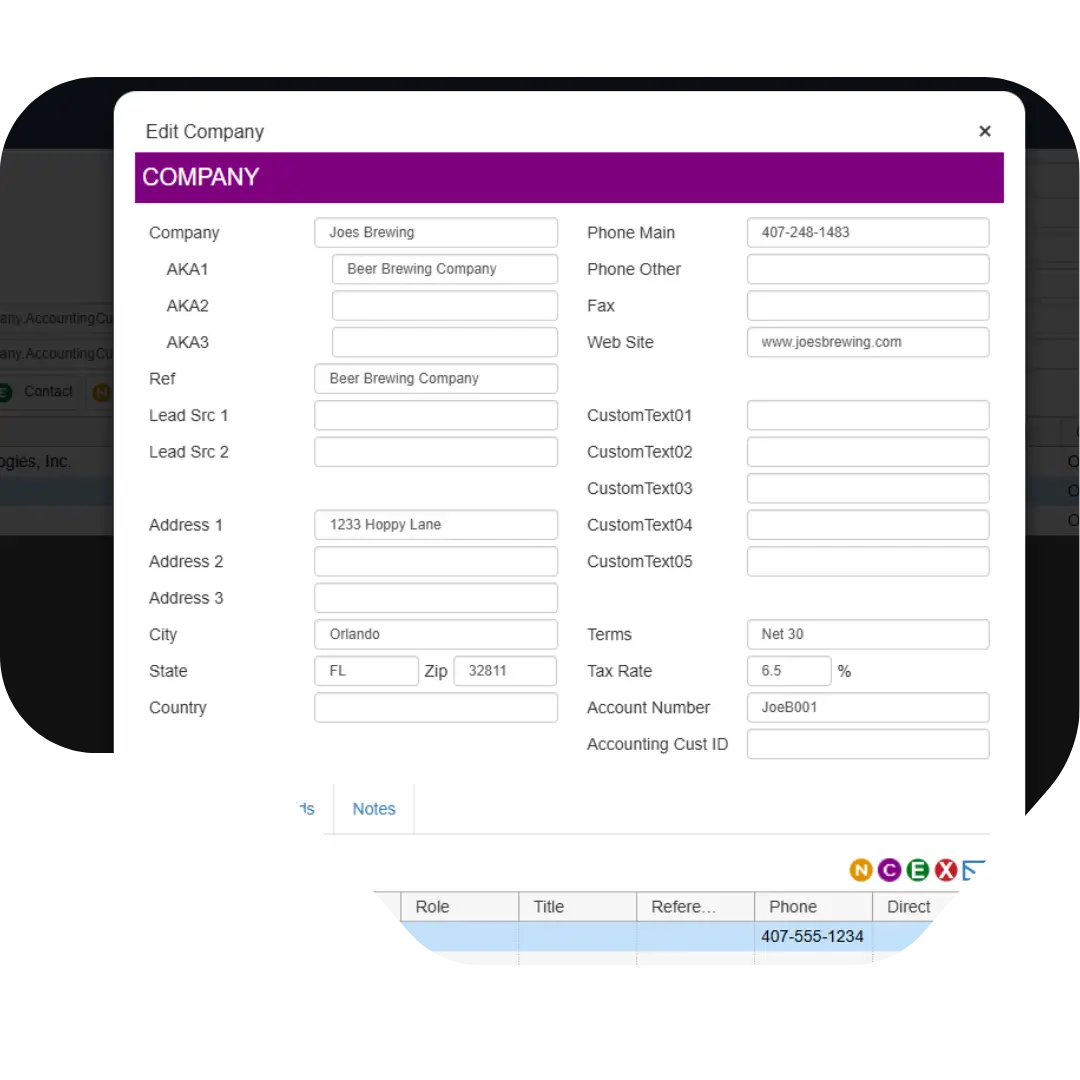
QuoteWerks Web organizes companies and their related contacts together, allowing your team to manage real customer relationships. Each company can have multiple associated contacts, making it easy to handle roles such as decision makers, billing contacts, and shipping contacts.
This structure ensures your quotes reflect how your customers actually operate and reduces confusion across your team.

Quote Workflow
Search and use customer data while building quotes
Reduce duplicate entry and improve speed
Your team can search for companies and contacts directly within the quoting workflow using company name, contact name, phone number, or email address. Once selected, that information is applied to the quote immediately.
This eliminates repeated data entry, reduces errors, and ensures consistency across users and documents.
Customer Intelligence
Apply customer-specific data automatically to quotes
Use stored data to improve accuracy and consistency
The built-in contact database allows QuoteWerks to apply customer-specific information during the quoting process.
Customer records can include payment terms, tax rates, and profile data that are automatically applied when creating quotes. This reduces manual decisions and ensures each quote aligns with how that customer does business.
Customer profiles can also be used to determine pricing, allowing QuoteWerks to apply the correct pricing structure based on the customer record. This helps ensure consistency across quotes and reduces the risk of incorrect pricing.

Fast Onboarding
Import existing customer data and start quickly
Use your current data without rebuilding everything
Most businesses already have customer data stored in spreadsheets or other systems. QuoteWerks allows companies and contacts to be imported from CSV, tab-delimited, or any delimited files.
This allows your team to move into a structured quoting workflow quickly without starting from scratch. It also reduces onboarding time and improves adoption.
Real-World Usability
Capture notes, aliases, and important account details
Give your team the context needed to quote correctly
QuoteWerks allows your team to store internal notes, important account details, and contextual information alongside customer records.
Company aliases can also be used to manage alternate names or variations, making it easier to find the correct account even when data is inconsistent.
These features reduce errors, improve communication, and ensure your team has the right information when creating quotes.

Flexible Growth
Improve your quoting process now and expand later
Start without a CRM and evolve when your business is ready
Many companies delay improving their quoting process while evaluating CRM options. This often leads to continued reliance on spreadsheets and disconnected systems.
The built-in contact database allows your team to move forward now by centralizing customer data and improving quoting consistency.
When your needs grow, QuoteWerks integrates with CRM systems, allowing you to align quoting with pipeline and revenue tracking. Your team can also export companies and contacts, making it easier to transition data into a CRM without losing information.
Next Step
See how QuoteWerks Web manages contacts and quoting together
Create a more efficient quoting workflow without relying on disconnected tools
QuoteWerks Web helps your team organize customer data and create accurate quotes whether or not you use a CRM.
Contact Database Details
Built-in contact database functionality in QuoteWerks Web
Understand how companies, contacts, and customer data are managed
QuoteWerks Web uses a company and contact structure that allows multiple contacts to be associated with a single company. This makes it possible to manage real customer relationships, including different roles such as decision makers, billing contacts, and shipping contacts, without duplicating data across records.
Users can search for companies and contacts directly within the quote using fields such as company name, contact name, email address, or phone number. Once selected, the contact information is automatically applied to the quote, reducing manual entry and improving consistency.
Yes. QuoteWerks Web can apply customer-specific data such as payment terms, tax settings, and profile details during the quoting process. This ensures quotes reflect how each customer does business and reduces the need for manual adjustments.
Yes. Companies and contacts can be imported from common file formats such as CSV or tab-delimited files. This allows businesses to bring in existing customer data from spreadsheets or other systems without rebuilding their database manually.
Yes. Multiple contacts can be associated with a single company and used for different roles within the quote, such as Sold To, Ship To, or Bill To. This helps ensure the correct information is used throughout the quoting process.
Yes. QuoteWerks allows users to store internal notes, important account details, and contextual information directly within customer records. This helps teams maintain consistency and avoid missing key details when creating quotes.
Yes. Company aliases can be used to store alternate names or variations, making it easier to locate the correct account even when customer data is inconsistent or entered differently.
Yes. Contacts can be managed, updated, and reassigned between companies as needed. This helps maintain accurate records as customer relationships change over time.
Built-In Contact Database FAQ
Common questions about quoting without a CRM
Understand when and how to use the built-in contact database in QuoteWerks Web
No. QuoteWerks Web does not require a CRM because it includes a built-in contact database that allows your team to manage companies and contacts directly within the quoting software. This makes it possible to create structured, consistent quotes without relying on an external system.
For many businesses, especially those using spreadsheets, Outlook contacts, or legacy desktop systems, this provides a practical way to organize customer data and improve quoting accuracy without taking on a full CRM implementation. It also allows teams to standardize how customer information is used across quotes, reducing errors and saving time.
The built-in contact database is a strong fit for companies that do not currently use a CRM, rely on a desktop CRM that cannot integrate with QuoteWerks Web, or use a platform that is not supported. It is also useful for teams that want to improve their quoting process before investing in a larger system.
This is especially common for small to mid-sized businesses that need better structure around customer data but are not ready to implement a full CRM. It allows those teams to move away from disconnected tools and into a more consistent quoting workflow without increasing complexity.
Not in all cases. A CRM is designed to manage the full customer lifecycle, including pipeline tracking, activity history, forecasting, and reporting across sales and marketing.
The QuoteWerks built-in contact database is focused specifically on supporting the quoting process. It provides the structure needed to manage companies, contacts, and customer-specific quoting details, but it does not attempt to replace the broader capabilities of a CRM.
For many companies, this is exactly what is needed to improve quoting accuracy and efficiency. As the business grows, QuoteWerks can integrate with CRM platforms to extend that functionality.
A CRM becomes more valuable as your sales process grows in complexity. This typically happens when your team needs better visibility into pipeline, more structured activity tracking, improved forecasting, or coordination across multiple sales reps.
At that point, integrating QuoteWerks with a CRM allows quotes to align directly with deals, contacts, and revenue tracking. This creates a more complete view of the sales process without changing how your team builds quotes.
The key advantage is that you do not need to wait for this stage to improve your quoting process. You can start with the built-in contact database and expand into a CRM when the business is ready.
Yes. QuoteWerks allows you to export companies and contacts so they can be imported into a CRM when you are ready to transition. This ensures your team is not locked into a single system and does not need to rebuild customer data from scratch.
This is important for businesses that want to improve quoting today but are still evaluating CRM options. You can centralize your customer data inside QuoteWerks, use it to improve quoting accuracy and consistency, and then move that data into a CRM later as your needs evolve.
Waiting often means continuing to rely on spreadsheets, email threads, or disconnected systems to manage customer information. This leads to inconsistent data, repeated entry, and slower quote turnaround times.
The built-in contact database allows your team to improve quoting accuracy and efficiency immediately. You can standardize how customer data is stored and used, reduce manual work, and create a more consistent quoting process without delaying progress.
When a CRM decision is made later, QuoteWerks can integrate with that system and your existing customer data can move with you. This makes it more practical to improve your process now rather than waiting for every system decision to be finalized.
Yes. Spreadsheets and Outlook contacts are not designed to support a structured quoting workflow. They often lead to inconsistent data, duplicate entries, and difficulty finding the correct customer information when creating quotes.
The built-in contact database in QuoteWerks Web provides a centralized, searchable system where companies and contacts are organized and directly connected to the quoting process. This allows your team to quickly find the correct information, apply it to quotes, and maintain consistency across users.
Over time, this reduces errors, improves efficiency, and creates a more reliable quoting process compared to disconnected tools.