
Vendor RFQ Software
Vendor RFQ Software to Request, Track, and Compare Vendor Quotes
Send a single request for quote (RFQ) to multiple vendors, manage responses, and choose the best pricing, all within QuoteWerks. VendorRFQ is available as an add-on module.


The Problem
The Vendor RFQ Process Is Manual and Difficult to Manage
Email, spreadsheets, and scattered vendor responses slow everything down
The traditional RFQ process is fragmented. Sales teams send quote requests through email, track responses manually, and attempt to compare vendor pricing across disconnected tools.
As deals become more complex, this approach slows everything down. Vendor responses are buried in inboxes, pricing comparisons are inconsistent, and follow-ups are often missed.
Delays in vendor responses can slow down your entire sales cycle and impact your ability to close deals quickly.
Without a centralized vendor RFQ system, it becomes difficult to maintain control, ensure accuracy, and make confident purchasing decisions.
The Solution
Centralize Your Vendor RFQ Workflow in One System
Send RFQs, track responses, and compare vendor pricing without leaving your quote
QuoteWerks VendorRFQ software brings structure to your RFQ process by centralizing vendor communication, pricing requests, and response tracking in one place.
Send a single RFQ to multiple vendors at once, eliminating repetitive outreach and significantly reducing turnaround time.
Instead of switching between email, spreadsheets, and multiple systems, your team can track vendor responses, compare pricing, and make decisions directly within the quoting workflow.
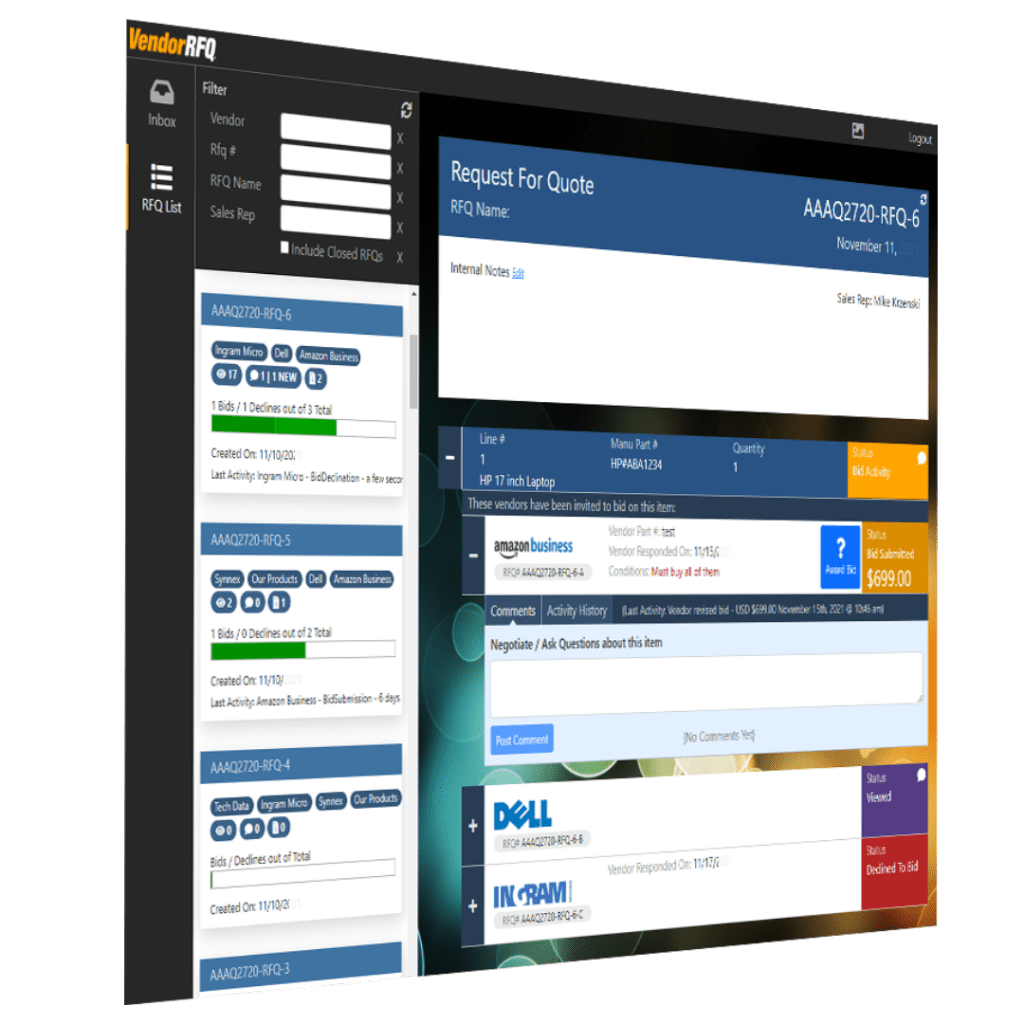
Gain real-time visibility into RFQ status, including which vendors received, viewed, and responded to your request.
By streamlining vendor communication and pricing comparison, VendorRFQ helps accelerate the quoting process and reduce sales cycle time.
This ensures your team can make faster, more informed purchasing decisions based on complete and accurate vendor data.
VendorRFQ is available as an add-on module for teams that need structured vendor quote management beyond standard integrations.
How It Works
A Structured RFQ Process From Request to Vendor Selection
Request pricing, receive responses, and compare vendor quotes in one place
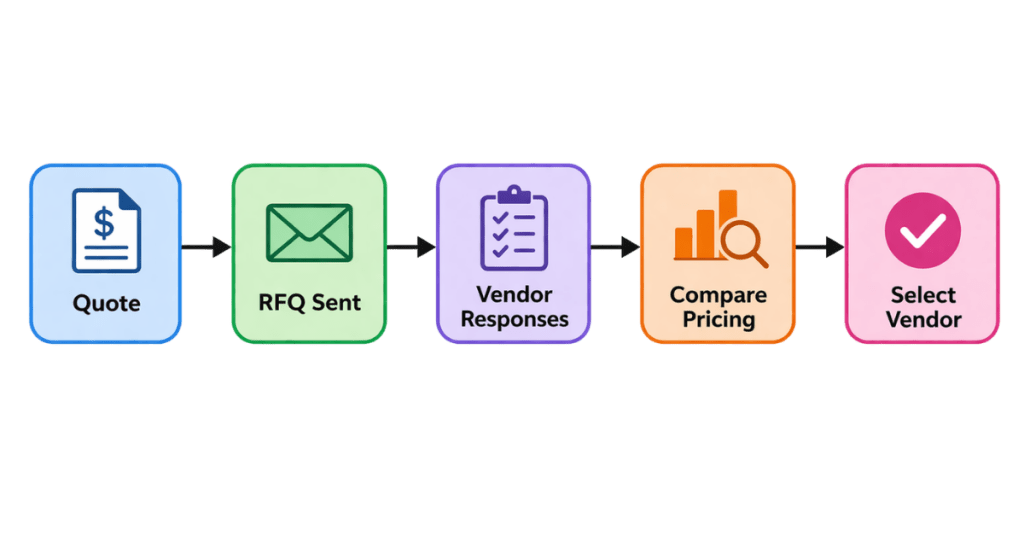
Start by selecting the items in your quote that require vendor pricing. Send an RFQ to one or multiple vendors directly from QuoteWerks.
Vendors receive the request via email and can submit their pricing and details. They can also ask questions or provide updates within the RFQ, keeping all communication organized.
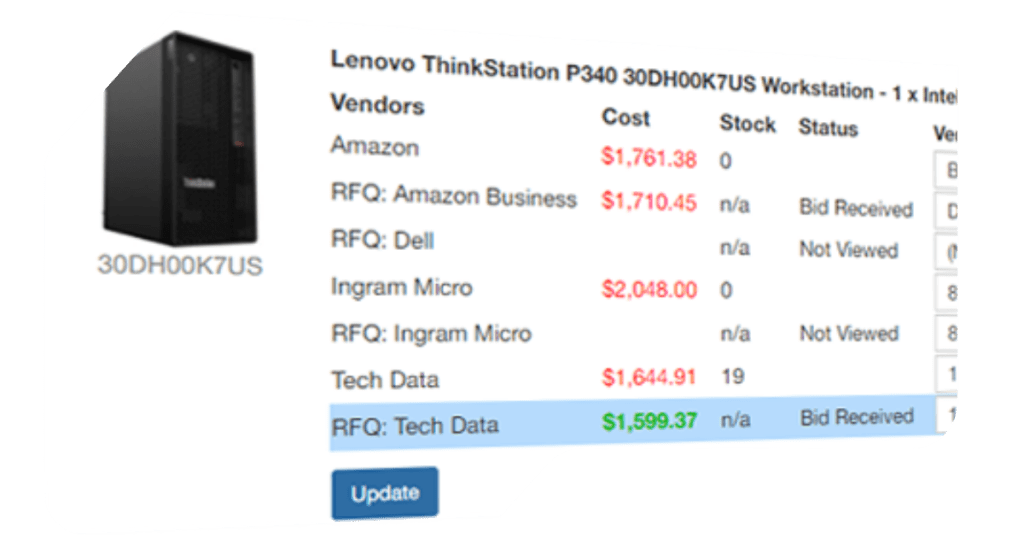
Responses are captured and organized automatically, allowing your team to review vendor quotes side by side.
Once all responses are in, you can select the best option and continue building your quote without disrupting your workflow.
Key Capabilities
Everything You Need to Manage Vendor RFQs Efficiently
Full visibility, structured communication, and faster vendor comparison
VendorRFQ software in QuoteWerks provides the core functionality needed to streamline vendor quote management and reduce the complexity of sourcing pricing.
- Send RFQs to multiple vendors at once
- Track vendor response status (sent, viewed, responded)
- Receive and organize vendor quotes automatically
- Compare vendor pricing side by side
- Communicate with vendors within the RFQ process
- Add or update vendors throughout the RFQ lifecycle
- Maintain a centralized record of all vendor interactions
Keep sales and purchasing teams aligned with a shared, centralized view of vendor pricing and communication.
VendorRFQ is an add-on module and is not included with standard QuoteWerks subscription editions.
Vendor Communication
Keep Vendor Conversations Organized and Actionable
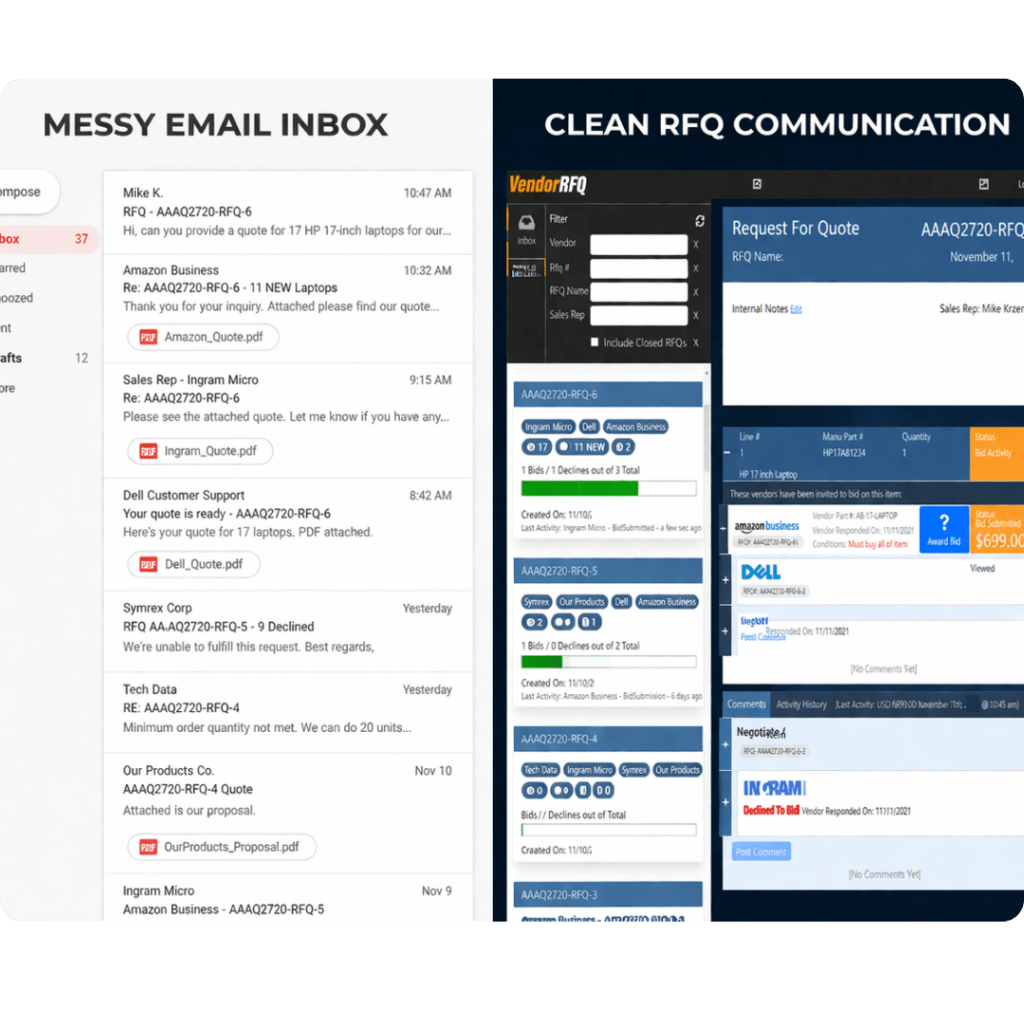
Replace scattered email threads with structured vendor communication
VendorRFQ improves how your team communicates with vendors by keeping all interactions tied directly to the quote.
Instead of managing long email chains, vendors can review requests, submit pricing, and provide updates in a consistent format. This reduces confusion, minimizes back-and-forth communication, and ensures nothing gets lost.
Vendors can respond directly via email without needing to log into a system, making adoption easy for any supplier.
A structured communication process leads to faster responses, better pricing discussions, and more efficient deal execution.
When to Use Vendor RFQ Software
Ideal for Non-Integrated Vendors and Complex Pricing Scenarios
Use VendorRFQ when real-time pricing is not available
VendorRFQ is most useful when working with vendors that do not provide real-time pricing or when sourcing items that require manual quote requests.
It helps standardize vendor communication and ensures your team can still compare pricing effectively, even without integrations.
Common scenarios include sourcing specialty products, working with new vendors, or managing complex deals with multiple supplier options.

Platform Fit
Extend Your Quoting Workflow Beyond Real-Time Integrations
Combine VendorRFQ with distributor integrations for complete pricing coverage
QuoteWerks provides real-time distributor integrations for instant pricing and availability. VendorRFQ complements these capabilities by handling vendors that require manual quote requests.
By combining both approaches, your team can access real-time data when available and structured RFQ workflows when needed.
This ensures complete coverage across all vendor pricing scenarios without gaps in your process.
FAQ
Frequently Asked Questions About Vendor RFQ Software
Vendor RFQ software helps businesses send request for quote (RFQ) requests to suppliers, collect pricing responses, and compare vendor quotes in a centralized system. Instead of manually emailing vendors and tracking responses across different tools, RFQ software organizes the entire process in one place. In QuoteWerks, users can select items within a quote, send RFQs to multiple vendors, and receive structured responses that can be reviewed side by side for faster and more accurate decision-making.
QuoteWerks replaces fragmented workflows with a centralized system that manages vendor communication, pricing requests, and response tracking. Instead of searching through inboxes or updating spreadsheets manually, all RFQ activity is tracked within the quoting environment. This reduces errors, improves response visibility, and helps your team respond faster to customers while maintaining better control over vendor pricing.
Yes. QuoteWerks allows you to send a single RFQ to multiple vendors simultaneously. This eliminates repetitive outreach, speeds up the pricing process, and allows you to gather competitive quotes quickly. It also improves your ability to compare pricing and select the best vendor without delays.
Vendor responses are automatically captured and organized within the RFQ workflow. You can see which vendors received the request, whether they have viewed it, and if they have responded. This visibility allows your team to follow up effectively and ensures that no vendor response is missed during the quoting process.
Yes. QuoteWerks provides a structured comparison view that allows you to evaluate vendor pricing across multiple suppliers. This removes the need for manual comparison and ensures that you are making decisions based on complete and accurate information.
No. Vendors can respond directly through the RFQ email they receive. This makes it easy for any supplier to participate without requiring additional accounts or system access, reducing friction and improving response rates.
Yes. Vendors can communicate directly within the RFQ process to ask questions, clarify details, or provide updates. This keeps all communication tied to the quote and ensures that important context is not lost.
No. VendorRFQ is designed to complement real-time integrations, not replace them. Integrations provide instant pricing when available, while VendorRFQ handles scenarios where pricing must be requested manually. Together, they provide complete coverage for vendor pricing.
VendorRFQ should be used when pricing is not available through integrations, when working with new or smaller vendors, or when comparing multiple supplier quotes for the same items. It is especially valuable in complex deals where pricing needs to be requested and negotiated.
VendorRFQ is an add-on module and is not included with standard QuoteWerks subscription editions. It can be added to extend your ability to request, track, and compare vendor quotes when real-time pricing is not available.