
The QuoteWerks integration with Microsoft Outlook BCM Overview
The combination of QuoteWerks and Microsoft Outlook BCM makes it easier to provide quotes and proposals to prospective customers.
-
 Integration OverviewThis video demonstrates the QuoteWerks integration with Outlook BCM.
Compatibility
QuoteWerks integrates with Outlook BCM 2007, 2010, and 2013 (English versions only).
So if you want to keep using BCM, do not upgrade Outlook past version 2013. Alternatively, you can use one of the 12 other CRMs that QuoteWerks integrates with.
In addition to the integration that QuoteWerks has with Outlook, the Outlook BCM integration adds the following functionality:
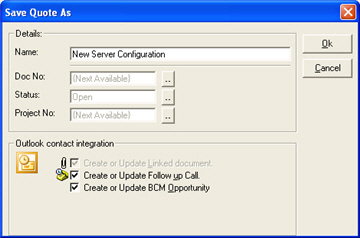
QuoteWerks Creates/Updates Sales Opportunities in Outlook BCM
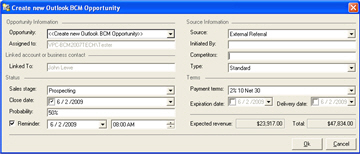
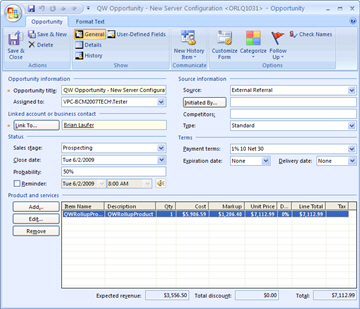
When saving a quote, QuoteWerks automatically creates or updates a Sales Opportunity under the Oppotunities for the Contact in Outlook BCM. When you are in Outlook BCM and select Opportunities for this contact you will see the sales opportunities and their sale amounts for each quote you have created for this Outlook BCM contact. The Sales Opportunity feature is very useful in determining your projected cash flow.
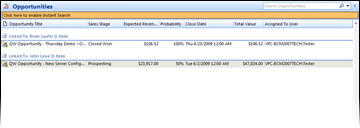
By creating sales opportunities in Outlook BCM you can generate reports
in Outlook BCM that give you insight into your sales pipeline. If you
already have a sales opportunity for this quote, it will
automatically update the existing one to reflect changes you have
made to the quote. If you need to forecast your sales for
each individual product you are selling in the quote, QuoteWerks
has a built-in reporting module that can create such a report.
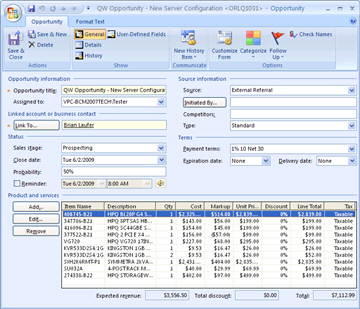
There is even an option that enables you to specify if you would like QuoteWerks to write the individual line items from the QuoteWerks Quote to the Outlook BCM Opprotunity.
QuoteWerks closes sales opportunities in Outlook BCM
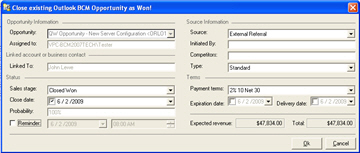
We create quotes with the expectation that the quotes will become orders. When the customer accepts the quote, QuoteWerks will convert the quote to an order and also convert your existing Outlook BCM Sales Opportunity into a "Closed as Won' sale. If no Sales Opportunity exists in Outlook BCM (This would be the case if a customer called to place an order without requesting a quote first), QuoteWerks will simply create a new "Closed as Won" Sales Opportunity in Outlook BCM.
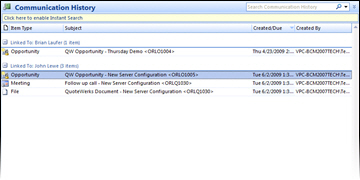
In Outlook BCM, you can run reports that tell you how much income was generated from the orders you have received. QuoteWerks also has a built-in reporting module that can create similar reports.