
QuoteWerks Integrates with GoldMine
Sell More with QuoteWerks and GoldMine
-
 Integration OverviewThis video demonstrates the QuoteWerks integration with GoldMine
Fill your GoldMine sales pipeline with Professional looking quotes and proposals
Work your sales pipeline harder and create more comprehensive quotes, proposals, and estimates!
Use QuoteWerks, sales quoting and proposal software solution, as a tool in your CPQ and Quote-to-Cash sales process.
Compatibility
 QuoteWerks integrates with GoldMine versions:
Versionsn 2024.1, 2023.4, 2023.3, 2023.2, 2023.1, 2022.4, 2022.2, 2022.1, 2021.2, 2021.1, 2020.1, 2019.1, 2018.2, 2018.1, 2017.1, 2016.1, 2015.2, and 2015.1Version 2014.1 and 2014.2 Premium Edition
Version 2013.1 Premium EditionVersion 8.0, 8.5, 9.0, 9.x Premium Edition **
Version 7.0, 7.5 Standard / Corporate Edition **
Versions 6.0, 6.5, 6.6, 6.7 *
Versions 5.0, 5.5, 5.7, FrontOffice 2000 *
Version 4.0 *
* QuoteWerks works with both the DBASE/Firebird and MS SQL editions of GoldMine. Through the various years, GoldMine has changed the name of their SQL edition. In these versions, their SQL edition was named the "Corporate Edition" and their DBASE edition sometimes named "Standard Edition" is sometimes named "Business Contact Manager" (BCM for short) in these years.
** As of April 30th, 2007, GoldMine is offered in 3 Editions: Corporate Edition aka 'CE' (version 7), Premium Edition aka 'PE' (version 8.x), and Enterprise Edition (aka 'EE'). Standard Edition is no longer sold (but QuoteWerks still integrates with it). QuoteWerks does not integrate with GoldMine Enterprise Edition as it is a completely different product line than Standard, Corporate, and Premium Editions. GoldMine Premium Edition was first released as version 8.
QuoteWerks pulls GoldMine contact information into the quote
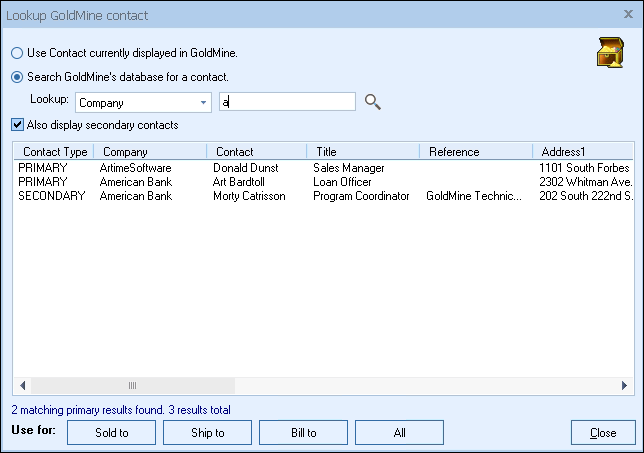 From our Sold To / Ship To tab of the QuoteWerks quote workbook, with a simple click of a button, QuoteWerks will fill in the contact information in the quote by pulling the contact information from the contact that is currently selected in GoldMine. You will never have to re-type your customer information. QuoteWerks can also search your entire GoldMine database to find the contact that you want to use in the quote. When you have found the contact, QuoteWerks will list the GoldMine primary and secondary contacts (secondary contacts are listed under the Contacts tab in GoldMine, and usually contain ship to addresses) allowing you to easily use primary and secondary contacts in your quote.
QuoteWerks pulls other GoldMine contact information into the quote
When you select the GoldMine contact to use in the quote, our innovative DataLink feature can automatically pull other information from GoldMine into the quote such as customer terms, customer sales tax rate, customer profile etc. Customer profiles can be used by QuoteWerks to determine the appropriate pricing a particular customer should receive.QuoteWerks prints information pulled from other GoldMine fields
QuoteWerks has a built-in print layout designer that allows you to customize the look of your quote. The print layout designer also allows you to easily insert data fields from GoldMine into the QuoteWerks print layout. Then, when you print the quote, QuoteWerks will pull data from the GoldMine contact fields that you inserted into the print layout resulting in a printed quote that includes information from your GoldMine contact record. This feature is different from the DataLink feature (described above) in that this extra data is pulled from GoldMine and printed, but not saved with the quote. When you need to save the information pulled from GoldMine into the quote, you would use the DataLink feature. So, for example, if you are using a field in GoldMine to store the contact’s assistant’s name, you can insert that GoldMine field into the print layout so that when the quote is printed, the assistant’s name will be printed on the quote, but not saved with the quote.QuoteWerks Creates/Updates linked documents in GoldMine
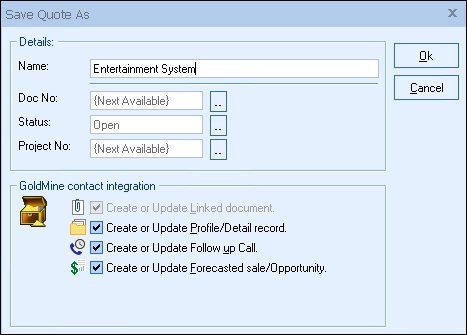
When saving a quote, QuoteWerks automatically creates a linked document under the Links tab in GoldMine that links to the quote you are saving. When you are in GoldMine and select the Links tab, you will see all the quotes that you have done for this GoldMine contact. You can even double-click on the linked document, and QuoteWerks will open and display the quote the link refers to. This feature is very useful for organizing and finding your quotes from within GoldMine.
QuoteWerks Creates/Updates forecasted sales/opportunities in GoldMine
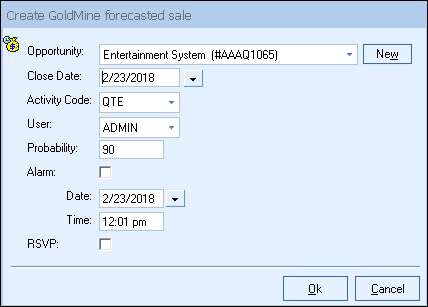
When saving a quote, QuoteWerks automatically creates a forecasted sale / opportunity under the Pending tab in GoldMine. When you are in GoldMine and select the Pending tab, you will see the forecasted sale amounts for each quote you have created for this GoldMine contact. The forecasted sale feature is very useful in determining your projected cash flow. In GoldMine, you can run forecasted sale reports that tell you how much income will possibly be generated from all the quotes you have generated. These reports also let you know when these quotes are estimated to become orders which again helps you estimate your cash flow. If you need to forecast your sales for each individual product you are selling in the quote, QuoteWerks has a built-in reporting module that can create such a report.
QuoteWerks Creates/Updates completed sales in GoldMine
We create quotes in the hopes that the quotes will become orders. When the customer accepts the quote, QuoteWerks will convert the quote to an order and also convert your existing GoldMine forecasted sale into a completed sale. If no forecasted sale exists in GoldMine (This would be the case if a customer called to place an order without requesting a quote first), then QuoteWerks will simply create a new completed sale in GoldMine. The completed sale record will be created under the History tab in GoldMine. In GoldMine, you can run reports that tell you how much income was generated from the orders you have received. QuoteWerks also has a built-in reporting module that can create similar reports.QuoteWerks Schedules Follow up calls in GoldMine
When saving a quote QuoteWerks offers to schedule a follow up call for you in GoldMine. By scheduling follow up calls you increase your chances of closing the sale! The follow up call will be listed under the Pending tab in GoldMine.QuoteWerks Creates profile/detail records in GoldMine
When saving a quote QuoteWerks offers to create a "QuoteWerksDocument" profile/detail record in GoldMine that contains the QuoteWerks quote number. This allows you to search for a QuoteWerks quote number from within GoldMine using the GoldMine Query menuQuoteWerks Logs e-mails sent from QuoteWerks in GoldMine
QuoteWerks has a built-in e-mail client allowing you to e-mail the quote to your customer with a single-click. Your customer’s e-mail address is automatically pulled from the GoldMine contact information, and after the e-mail has been sent the e-mail is logged under the GoldMine History tab as if you had sent the e-mail from within GoldMine itself.QuoteWerks can pull lookup list information from GoldMine
Many of the fields in QuoteWerks have a lookup list option. When you press the F2 key while in one of these fields, QuoteWerks will display a list of values that you can choose for the field. You can create a macro value that pulls information from a field in GoldMine. For example, if you press the F2 key while in the terms field in QuoteWerks, QuoteWerks will display a list of terms options that you have previously entered. You can create a new option that retrieves a value from a field in GoldMine where you normally store your terms.Initiate QuoteWerks activities from GoldMine menus
Custom menus in Goldmine can be used from inside GoldMine to make it easy for you to start QuoteWerks, and create a new quote, order, or invoice and pull in the customer information automatically by simply clicking on the internal custom menus.When QuoteWerks saves a quote, it also saves a linked document to GoldMine
that refers to the quote
The GoldMine synchronization features synchronize all linked documents, including QuoteWerks linked documents. So when you create a quote at the Los Angeles office, and then run the GoldMine synchronization process, someone in the New York office can double-click on the QuoteWerks linked document that has now appeared in their GoldMine installation. When they double-click on the linked document, QuoteWerks will detect that that quote is not in the New York office QuoteWerks database, and will proceed to add the quote to the New York office QuoteWerks database. Additionally, after the GoldMine synchronization process has completed, you can run QuoteWerks’s batch merge utility which updates the local office quote database with all the synchronization changes at once instead of one at a time.How it works… (for you technical types)
When GoldMine is running, and you save a quote you will be presented with the option to create or update a GoldMine linked document file. When you select this option the quote is also saved to this GoldMine linked document file in addition the local quote database. The linked document file is saved to the \QuoteWerks\DTF directory and has the same base name as the document number with a .DTF extension. From this point on we will call this file a DTF file ( for quote # A101, the linked document DTF file name would be A101.DTF).GoldMine’s synchronization feature will synchronize this file with the other GoldMine locations. If this DTF file does not exist at any other GoldMine locations (because you may have just created it), it will copy this file to the other locations and create the corresponding GoldMine linked document record in the other location’s GoldMine contact record. If the DTF file does exist at other locations, GoldMine will compare the date and time of the file at each location (taking into account time zone changes) to determine which one is the newest. It will then replace all the older DTF files at each location with the newest DTF file.
This feature was designed in a way that the version of the quote that is the newest will replace all the other versions of the quote at the other locations.
Take this applied example for two locations A and B. Both location A and B will have the identical version of the quote at 9:00am (first thing in the morning). Since synchronizing is generally done at night, location A could modify quote # 101 at 10:00am and location B could modify quote #101 at 11:00am. If no more changes where made during the rest of the day, the next morning both locations will have the quote #101 that location B had modified. The changes made at location A will be completely lost. This is a result of the way the synchronization process works. QuoteWerks cannot do anything to avoid this situation.
Because of the potential for this to happen, QuoteWerks automatically creates a backup copy of a quote before it does any updating. This feature will allow you to restore a quote that has been incorrectly replaced by a different locations quote. A backup copy of the quote will be saved to a file in the \QuoteWerks\DTF directory. The file will have the same base name as the document number, and will have a unique sequentially numbered extension. For quote # A101, the backup file name would be A101.001, A101.002, A101.003 etc. Each time the quote is backed up, QuoteWerks will increment the extension, so the latest backup will be the highest numbered extension.
We have talked about how GoldMine synchronizes the DTF linked document files, but not about how QuoteWerks handles these DTF files. QuoteWerks only recognizes that there are new or updated DTF files when you open a quote from QuoteWerks, or when you dbl-click on a linked document record in GoldMine. When you open a quote by either method, if QuoteWerks detects a DTF file linked to the quote it will analyze it. It will compare the DTF file to the version of the quote that is in the local quote database to determine if it is a newer version, the same version , an older version, or if it does not exist in the local quote database.
Newer
If the quote in the DTF file is newer than the quote in the database, a backup copy of the quote in the database will be made, and then it will be replaced with the quote from the DTF file.
Same/Older
If the quote in the DTF file is the same version or an older version QuoteWerks will ignore the DTF file and open the version that is in the database.
Does not exist
If the quote in the DTF file does not exist in the local quote database, it will be added to the local quote database.
No credit card required.